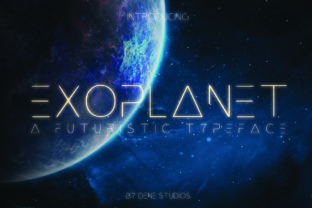
Exoplanet Font: A Futuristic Display Typeface for Bold Creators
There are fonts that sit quietly in the background, doing their job without calling attention to themselves. Then there are fonts that make an entrance—ones that grab your gaze and refuse to let go. Exoplanet belongs firmly in the second category. This handcrafted display typeface carries a distinctly futuristic energy, the kind that makes you think of interstellar travel, sleek technology, and forward-thinking design. If your creative project needs a visual voice that feels modern, daring, and unmistakably original, Exoplanet deserves a closer look.
What Makes Exoplanet Visually Distinctive
Every letter in Exoplanet was shaped by hand, and that human touch shows in subtle ways. The letterforms have an angular precision that feels engineered, yet they retain a warmth that purely digital typefaces often lack. There is a geometric backbone running through the design—clean lines, deliberate curves, and consistent proportions—but the overall impression is anything but sterile.
The futuristic aesthetic comes through in details like slightly condensed proportions, sharp terminals, and a sense of movement baked into each character. It does not mimic existing sci-fi movie logos or retro-futuristic tropes. Instead, it charts its own visual territory, which makes it a strong choice for designers who want something that feels fresh rather than derivative.
Because Exoplanet is a display font, it shines brightest at larger sizes. Think headlines, hero text, logos, and poster titles. It was never intended to set long paragraphs of body copy, and that is perfectly fine. Every font has a role, and Exoplanet's role is to command attention at first glance.
Where This Creative Font Truly Comes Alive
The practical applications for a typeface like this are surprisingly broad. Branding projects benefit enormously from a distinctive display font because it helps a business stand apart from competitors using the same handful of overused typefaces. A startup launching a tech product, a podcast about space exploration, or a gaming studio building its visual identity—these are all scenarios where Exoplanet fits naturally.
Logo design is another arena where this font excels. A strong logo needs to be memorable, and typography plays a massive role in that memorability. Exoplanet gives designers a foundation that already feels distinctive, reducing the need for heavy modification while still allowing room for customization.
Packaging design for modern consumer products—especially in categories like electronics, beverages, cosmetics, or specialty foods—can leverage this typeface to signal innovation and quality. When a customer picks up a product off a shelf, the font on the label is often the first thing their brain processes, even before they read the actual words.
Social media graphics are another sweet spot. Platforms like Instagram, TikTok, and Pinterest reward bold visual content. A striking headline set in Exoplanet can stop someone mid-scroll, which is half the battle in crowded feeds. Pair it with a clean sans serif for supporting text, and you have a combination that looks polished without feeling generic.
- Website hero sections that need a memorable headline
- Blog post titles for sites covering tech, design, or culture
- Event posters for conferences, launches, or exhibitions
- Merchandise like t-shirts, stickers, and tote bags
- Wedding or event invitations with a contemporary twist
- Editorial layouts for magazines and digital publications
- Digital products such as ebook covers or online course branding
- Marketing assets including ads, banners, and email headers
Building a Stronger Brand Identity With the Right Typeface
Typography is one of the most underestimated tools in brand building. People often think about colors and imagery first, but the fonts a brand uses shape perception just as powerfully. A premium font like Exoplanet signals that a brand pays attention to details, cares about its visual presentation, and is willing to invest in quality design assets.
Visual consistency is one of the biggest challenges for growing businesses. When a brand uses the same typeface across its website, social channels, packaging, and print materials, it creates a cohesive experience that builds recognition over time. Customers start associating that specific visual style with the brand, even before they read the name.
Readability matters too, and this is where honest conversation about display fonts is important. Exoplanet is designed for impact, not for setting body copy. The smart approach is to use it strategically—headlines, subheadings, callouts—and pair it with a highly readable serif font or sans serif font for longer text passages. This contrast actually strengthens the overall design because it creates visual hierarchy.
Practical Tips for Pairing and Using Display Typography
Font pairing is part art, part experimentation. A common mistake is pairing two fonts that compete for attention. Since Exoplanet has a strong personality, it works best alongside typefaces that play a supporting role. A neutral sans serif with clean geometry complements its futuristic feel without creating visual noise. Alternatively, a classic serif font can create an interesting tension between old and new that feels sophisticated.
Before committing to any font for a project, test it in context. Set your actual headlines, not just the alphabet. See how it looks at the sizes you will actually use. Check how it renders on different screens if the project is digital. Print a sample if the project involves physical materials. These small steps save hours of revision later.
Also review what font styles are included with the family. Many premium fonts come with multiple weights, alternates, or stylistic variations that expand your creative options significantly. Understanding what is available before you start designing prevents you from overlooking features that could solve a layout problem down the road.
Licensing is another practical consideration that deserves attention upfront. If you are using a font for a commercial project—a client's brand, a product you sell, marketing materials for a business—make sure the license covers that use. Most reputable font marketplaces make licensing terms clear, but it is always worth confirming before launch day arrives.
Making Exoplanet Work for Your Next Project
The best way to know if a typeface fits your vision is to experiment with it. Download Exoplanet, set a few headline options, drop them into your working layout, and see how they feel. Typography is deeply subjective, and what resonates for one project may not work for another. But when you find the right match, it is immediately obvious—the design just clicks.
For creators who gravitate toward modern typography and want a display font that feels genuinely handcrafted rather than mass-produced, Exoplanet offers a compelling option. Its futuristic character opens doors to design directions that feel fresh and intentional. Whether you are building a brand identity from scratch, refreshing a visual system, or simply looking for a creative font that does not look like everything else already in your library, this typeface is worth exploring.